Trace Restate Agents with Langfuse
This guide shows how to integrate Langfuse into your Restate agents and workflows for full observability — LLM calls, tool invocations, and durable workflow steps — all in a single unified trace.
What is Restate? Restate is a durable execution platform that makes agents and workflows resumable and resilient. Every non-deterministic action (LLM calls, tool API calls, MCP calls) is persisted in a durable journal. On failure, Restate replays the journal and resumes where it left off — with automatic retries, recovery, and idempotent execution.
What is Langfuse? Langfuse is an open-source observability platform for AI agents. It helps you monitor LLM calls, tool usage, cost, latency, and run automated evaluations.
Supported Agent Frameworks
Restate offers SDK integrations for multiple agent frameworks: OpenAI Agents SDK, Pydantic AI, Google ADK, pure Restate agents, etc. The example below uses the OpenAI Agents SDK. To learn how to integrate Langfuse and Restate with other frameworks, consult the Restate documentation.
Versioning
Restate's versioning model ensures that new deployments route new requests to the latest version, while ongoing executions continue on the version they started with. This means each Langfuse trace is linked to a single immutable artifact — one code version, one prompt version, one execution history — making it straightforward to compare quality across versions and spot regressions.
1. Install Dependencies
pip install restate-sdk openai-agents langfuse openinference-instrumentation-openai-agents hypercorn2. Configure Environment
Set up your API keys. You can get Langfuse keys from Langfuse Cloud or by self-hosting Langfuse.
LANGFUSE_PUBLIC_KEY=pk-lf-...
LANGFUSE_SECRET_KEY=sk-lf-...
LANGFUSE_BASE_URL=https://cloud.langfuse.com
OPENAI_API_KEY=sk-proj-...
3. Define the Agent
Use Restate's OpenAI Agents SDK integration to make agent steps durable. DurableRunner persists each LLM call in Restate's journal, so failed executions resume where they left off instead of restarting from scratch.
import restate
from agents import Agent
from restate.ext.openai import restate_context, DurableRunner, durable_function_tool

# Durable tool — executed exactly once, even across retries
@durable_function_tool
async def get_weather(city: str) -> dict:
    """Get the current weather for a given city."""

    # Do durable steps using the Restate context
    async def call_weather_api(city: str) -> dict:
        return {"temperature": 23, "description": "Sunny and warm."}

    return await restate_context().run_typed("Get weather", call_weather_api, city=city)


# AGENT
weather_agent = Agent(
    name="WeatherAgent",
    instructions="You are a helpful agent that provides weather updates.",
    tools=[get_weather],
)


# AGENT SERVICE
agent_service = restate.Service("agent")


@agent_service.handler()
async def run(_ctx: restate.Context, message: str) -> str:
    # Runner that persists the agent execution for recoverability
    result = await DurableRunner.run(weather_agent, message)
    return result.final_output


if __name__ == "__main__":
    import hypercorn
    import asyncio
    from agent import agent_service

    app = restate.app(services=[agent_service])

    conf = hypercorn.Config()
    conf.bind = ["0.0.0.0:9080"]
    asyncio.run(hypercorn.asyncio.serve(app, conf))
4. Enable Langfuse Tracing
Initialize the Langfuse client and set up the tracing processor. This connects the OpenAI Agents SDK spans to Restate's execution traces, so everything appears as a single unified trace in Langfuse.
from langfuse import get_client
from opentelemetry import trace as trace_api
from openinference.instrumentation import OITracer, TraceConfig
from openinference.instrumentation.openai_agents._processor import OpenInferenceTracingProcessor
from agents import set_trace_processors
from restate.ext.tracing import RestateTracer

# Initialize Langfuse (sets up the global OTel tracer provider + exporter)
langfuse = get_client()
tracer = OITracer(
    RestateTracer(trace_api.get_tracer("openinference.openai_agents")),
    config=TraceConfig(),
)
set_trace_processors([OpenInferenceTracingProcessor(tracer)])
The RestateTracer flattens the OpenAI Agents SDK spans under Restate's parent span, so the trace hierarchy in Langfuse mirrors the actual execution flow.
Restate also exports its own execution traces (workflow steps, retries, recovery) as OpenTelemetry spans. By pointing Restate's tracing endpoint at Langfuse, both agentic and workflow spans appear in the same trace.
5. View Traces in Langfuse
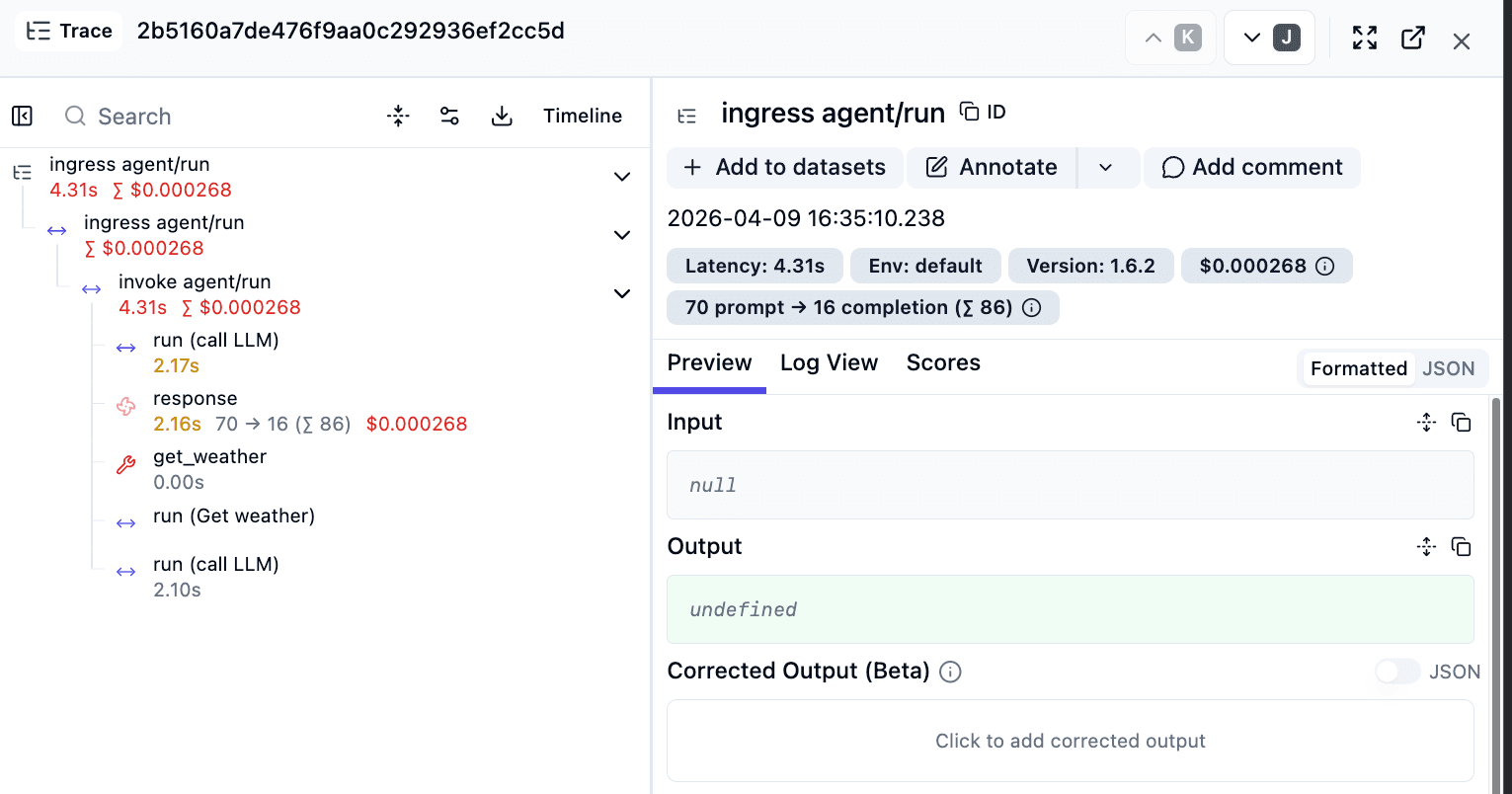
After running the agent (see instructions), the trace in Langfuse shows both the agentic steps and the workflow steps. For LLM calls, you can inspect inputs, prompts, model configuration, and outputs.
Prompt Management with Restate
You can use Langfuse Prompt Management with Restate. Each prompt fetch becomes a durable step — retries reuse the same prompt, while new executions pick up updated versions.
from langfuse import get_client

langfuse = get_client()

def fetch_prompt() -> str:
    prompt = langfuse.get_prompt("claim-agent", type="text")
    return prompt.compile()

# Durably journaled — same prompt is used on retries
prompt = await ctx.run_typed("Fetch prompt", fetch_prompt)Ragas
Optimize your RAG pipelines with Langfuse and Ragas integration for efficient evaluation, monitoring, and performance enhancement.
Semantic Kernel
Discover how to integrate Langfuse with Semantic Kernel for enhanced LLM application monitoring, debugging, and tracing. Improve your AI development workflow today.
